
A user finishes filling out your signup form. They type their name, pick a password, and enter their email as jordan@gmial.com — one transposed character. They hit submit. From your dashboard, everything looks fine: another signup, another row in the users table. But no welcome email lands. No receipt arrives. When they try to reset their password three days later, that link goes nowhere either. This user didn't churn. They never got the chance to activate, because a single wrong character quietly severed every future touchpoint you had with them.

You are probably staring at signup numbers that never convert to activated users, and a meaningful slice of that gap is typos you could have caught at the point of entry. One email-validation analysis found that roughly 2–5% of collected email addresses contain a typo — that's 200 to 500 lost contacts for every 10,000 signups a year. Church-management platform Planning Center found the single misspelling gmail.con in their system more than 37,000 times, causing hundreds of thousands of undelivered messages. Every one of those bounces decays sender reputation, inflates acquisition cost, and poisons deliverability metrics. This piece shows you how to catch a typo in email input in real time, when to correct versus block, and how to build a validation layer that stops the bleed.
Table of Contents
- Why Email Typos Slip Through and What They Actually Cost You
- The Most Common Email Typos and the Patterns Behind Them
- Client-Side vs. API Validation — Where Should You Catch Typos?
- Building a "Did You Mean?" Suggestion Flow That Recovers Signups
- When to Correct, When to Block, and When to Flag for Review
- Integrating Real-Time Typo Detection Into Your Signup Flow
- Your Email Typo Defense Checklist
- Frequently Asked Questions
Why Email Typos Slip Through and What They Actually Cost You
To fix typos precisely, you first need to know where they happen. Every email address has four zones, and each one collects a distinct class of error.
The local part — everything before the @ — picks up missing or extra characters. A user typing quickly turns john@ into jhon@, or adds a stray letter. The @ symbol itself gets doubled (user@@domain.com) or dropped entirely, producing user.gmail.com, which is not an email address at all. The domain is where the highest-volume errors live: misspelled provider names like gmial.com, gamil.com, gmal.com, gnail.com, yaho.com, yahooo.com, hotmal.com, and outlok.com. Finally, the TLD collects slips like .con, .cmo, .ne, and .co in place of .com — the n sits right next to m, which is exactly why gmail.con alone showed up over 37,000 times in one production system.

What a Bad Address Actually Breaks
An invalid address causes a hard bounce — a permanent delivery failure triggered by an invalid address, a non-existent domain, or a blocked recipient. That's different from a soft bounce, which is temporary: a full inbox, a transient server error, a mailbox that's briefly over quota. Soft bounces resolve on retry. Hard bounces never do.
The damage runs down a chain. According to email infrastructure provider SMTP.com, hard bounces above threshold decay your sender reputation, and once that reputation drops, ISPs start filtering and throttling your mail — even the mail going to valid recipients. The heuristics most deliverability sources converge on: a total bounce rate under 2% is healthy, anything above 5% is damaging, and hard bounces specifically should stay under roughly 0.5%. These are vendor and ESP rules of thumb, not regulated standards — different sources draw the "problematic" line anywhere from 2% to 10% — so treat them as operational targets, not law.
The wasted-spend angle compounds the deliverability hit. You paid to acquire a lead you can now never contact. Your transactional flows break silently — receipts, password resets, and confirmation links all route into the void. And your analytics lie to you, counting signups that can never activate, which quietly inflates your conversion denominator and hides the real problem.
A silent typo doesn't show up as an error in your dashboard — it shows up as a user who never came back.
One Critical Split: Typos Are Not Disposable Emails
Here is the distinction that drives every policy decision later. An honest typo and a deliberately fake address look similar in your database but demand opposite handling. A typo is a salvageable, well-intentioned mistake — the user wanted to reach their real inbox and fumbled the keys, so the right move is to correct it and keep them. A disposable or temporary address is deliberate evasion — someone gaming a free trial or dodging follow-up — and the right move is to reject it. A disposable email address checker handles the second case; a suggestion flow handles the first. Conflate them and you'll either block real customers or admit abusers. The rest of this guide keeps the two on separate tracks.
The Most Common Email Typos and the Patterns Behind Them
Before you can build correction logic, you need a reference of what you're correcting and why it clusters the way it does.
| What the user typed | What they meant | Error type | Catchable by syntax alone? |
|---|---|---|---|
gmial.com |
gmail.com |
Domain transposition | No — needs domain intelligence |
gamil.com |
gmail.com |
Domain transposition | No |
yaho.com |
yahoo.com |
Missing character | No |
yahooo.com |
yahoo.com |
Extra character | No |
hotmal.com |
hotmail.com |
Missing character | No |
gmail.con |
gmail.com |
TLD error | Partial (TLD rules) |
user@@domain.com |
user@domain.com |
Doubled @ |
Yes |
user@gmail |
user@gmail.com |
Missing TLD | Yes |
Three mechanisms explain nearly all of these. Keyboard adjacency produces gmial (the i and a transposed) and gamil — fingers land on neighboring keys or fire out of order. Phonetic guessing produces hotmal and yaho, where the user spells by sound rather than memory. And autocomplete and mobile misfires produce the rest: small touch keyboards plus aggressive autocorrect drop or swap characters, and TLD slips like .con happen because n neighbors m on the keyboard.
These are high-frequency patterns, not edge cases. Planning Center's gmail.con count of 37,000-plus in a single system is the proof — one specific misspelling, repeated tens of thousands of times. An analysis of millions of validated emails by ValidateList shows the same clustering around Gmail, Yahoo, and Outlook variants. If you want a ready-made backbone for your suggestion list, the open-source common-email-domain-typos repository on GitHub maps hundreds of misspellings to their intended domains, and at least one commercial typo-correction module claims coverage of 150-plus common domain typos — which tells you the addressable set is large but finite.
Now the nuance that shapes everything downstream: some of these typos are catchable by pure syntax rules and some are not. A doubled @, a missing @, or a missing TLD violates the shape of an address — regex catches those instantly. But gmial.com is a perfectly well-formed address. It has a local part, an @, a domain, and a .com TLD. It passes email address validation that only checks structure. Catching it requires domain intelligence — a known-provider list paired with a distance algorithm, or a live lookup that confirms the domain and mailbox actually exist. That distinction is the whole reason you need layers rather than a single check.
Client-Side vs. API Validation — Where Should You Catch Typos?
Four approaches exist for catching typos, and each catches a different failure that the others miss. The matrix below scores them; the commentary explains where each earns its keep.
| Approach | Catches domain typos? | Catches invalid mailbox? | Adds UX friction? | Flags disposable? |
|---|---|---|---|---|
| Regex / syntax check | No | No | None | No |
| Client "Did you mean?" | Partial (known list) | No | Low | No |
| MX / DNS lookup | No | No (domain only) | Low | No |
| Real-time verification API | Yes | Yes | Low | Yes |
Regex and syntax checks catch shape errors — missing @, doubled @, missing TLD — instantly and at zero network cost. They run in the browser before any request fires. Their blind spot is total for well-formed misspellings: gmial.com passes every syntax rule ever written, because it is syntactically valid. Maintenance is near zero, which is why this layer should always be present as your free first pass.
Client-side "Did you mean?" suggestions catch near-miss domain typos using a static provider list plus an edit-distance calculation, typically Levenshtein. This delivers excellent UX — the correction appears instantly, no server round-trip — but it's only as good as the list behind it. Domains not on the list slip through untouched, and the list needs ongoing upkeep as new providers and corporate domains appear. It recovers honest mistakes for common providers but cannot vouch for whether any mailbox actually exists.
MX/DNS lookup confirms that a domain is configured to receive mail, which catches non-existent and dead domains. What it can't do is confirm the specific mailbox. A domain can have valid MX records while the individual address bounces, so this layer narrows the problem without closing it.
Real-time verification API combines all three — syntax, domain and MX resolution, and mailbox-level checks — at the moment of entry. Clearout's definition of real-time verification captures this: validating format and deliverability the instant the address is entered, so only deliverable addresses reach your list. Crucially, a well-built API also flags disposable addresses in the same response, closing the typo-versus-fake gap in one call rather than two systems.
Regex can tell you an address is shaped correctly. It can't tell you the mailbox is real.
The conclusion is layered defense, not a single winner. Regex is free and instant, so run it first. Suggestions recover the honest near-misses at low cost. Only a live API confirms the mailbox exists and screens for disposables — so it's the strongest single layer, and it belongs last in the chain where the cheaper checks have already filtered the obvious cases.
Be honest about the ceiling, though. Even real-time verification is not infallible. Typos that land outside known provider lists can pass unflagged. Some mailbox providers restrict verification for privacy, returning ambiguous rather than definitive results. And intermittent DNS issues can produce false negatives on domains that are actually fine. The API is your strongest layer — treat it as that, not as a guarantee that no bad address ever gets through.
Building a "Did You Mean?" Suggestion Flow That Recovers Signups
The governing principle here is correction over punishment. A good suggestion recovers a signup that a hard block would have lost. Here's the sequence that gets you there.
1. Validate syntax on blur, not on every keystroke. Firing validation on each keypress throws errors while the user is still mid-typing — they see red before they've finished the domain. Validating on blur waits until they leave the field, so the check runs against a complete attempt. This one timing decision is the difference between a form that feels helpful and one that feels hostile.
2. Run the domain against a known-provider list plus edit-distance. Compute the Levenshtein distance between the typed domain and each known domain. gmial.com sits at distance 2 from gmail.com, comfortably inside a near-miss threshold. Seed your list from the open-source common-email-domain-typos repository, or start with a curated top-50 like the one Planning Center deployed. Distance thresholds keep you from suggesting wild corrections for genuinely unusual domains.
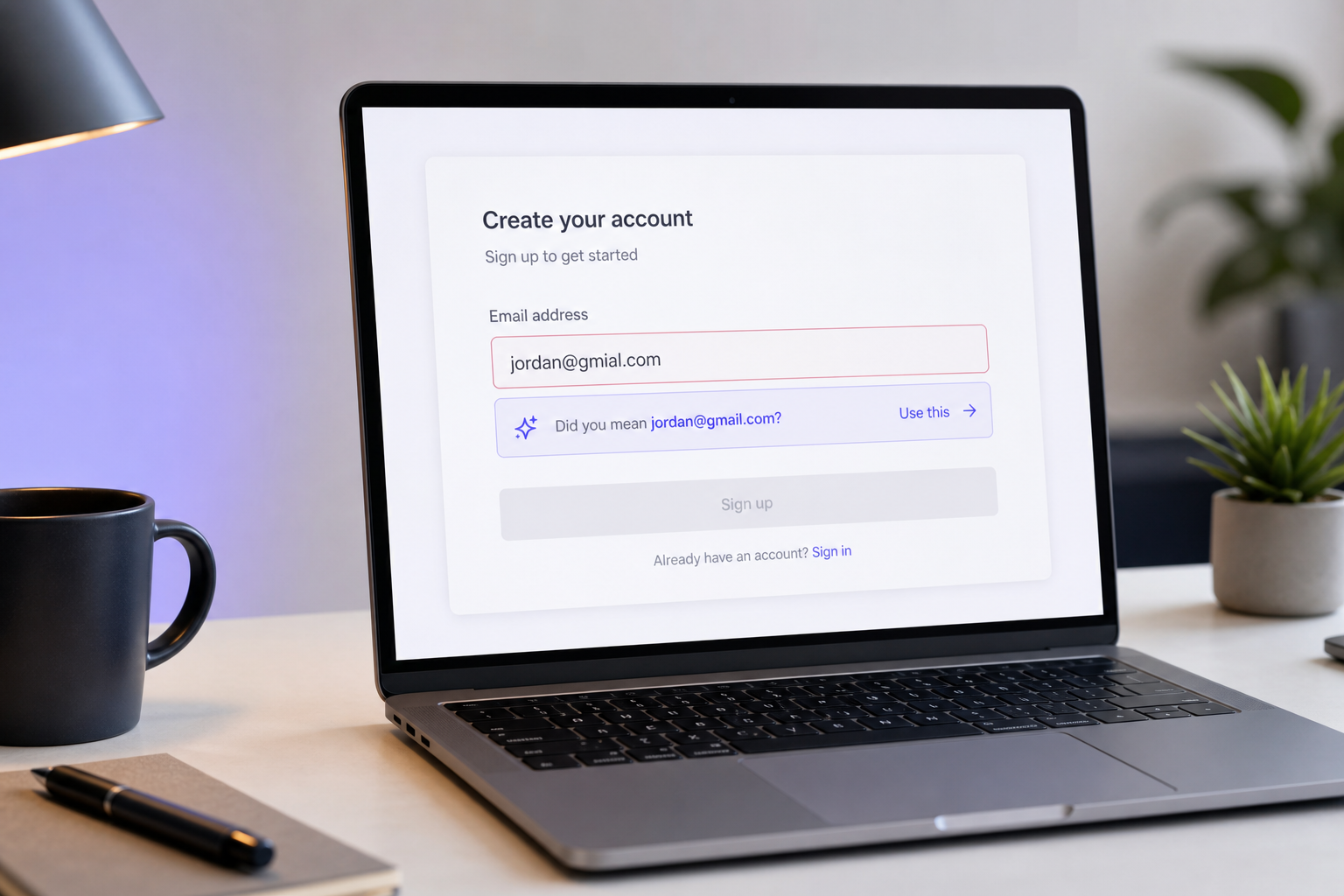
3. Surface a non-blocking inline suggestion. Display "Did you mean name@gmail.com?" beneath the field. Never a hard error, never a blocked submit button. The user stays in control — they can accept your suggestion or ignore it and proceed. A suggestion that blocks is just a rejection wearing a friendlier label.
4. Offer one-click accept to auto-correct. A single tap should replace the field value with the corrected address. Do not force the user to retype anything — retyping is friction, and friction is where signups die. The whole point is to make the fix effortless.
5. Fall back to real-time API verification for domains outside the known list. Static lists cannot cover novel domains, corporate domains, or the long tail of small providers. When the typed domain isn't on your list and isn't a near-miss of anything on it, hand off to the API, which confirms deliverability for any domain rather than only the ones you've catalogued. This is exactly where list-based suggestions go blind and live email address validation picks up the coverage.
6. Log every correction. Capture which suggestions users accept. Over time this tells you your specific audience's real error patterns — which may differ from the generic list — and lets you expand and tune your provider list against actual data rather than assumptions.
Planning Center's own result is the benchmark worth remembering: deploying a curated top-50 misspelled-domain list across their input fields measurably reduced undelivered emails. You don't need a machine-learning model to move this number. You need a good list, edit-distance math, and a non-blocking UI.
When to Correct, When to Block, and When to Flag for Review
Not every questionable address deserves the same treatment. Map each signal to an action, and tie each action to a business outcome, before you ship — not after the support tickets arrive.
Correct (auto-suggest): Near-miss domain typos like
gmial.com, TLD slips like.con, and obvious transpositions. Outcome: you recover signups that would otherwise be lost and prevent bounces before they ever touch your sender reputation.Block outright: Unsalvageable syntax, confirmed non-existent domains, and disposable or temporary domains used to abuse free trials. Outcome: you protect trial integrity and keep invalids off your list entirely. One list-hygiene analysis estimates that around 15% of addresses on a typical list are invalid and roughly 22.5% of valid addresses go stale each year, which is exactly why a strict gate at entry pays off — you're stopping the intake of garbage before it dilutes everything downstream. This is where a disposable email address checker belongs in the flow, screening deliberate evasion in the same pass that corrects honest mistakes.
Flag / soft-friction: Role-based addresses (
admin@,info@), catch-all domains, and low-confidence results. Outcome: you allow them but monitor rather than reject, which avoids falsely turning away legitimate business users who genuinely use a shared inbox.Whitelist / always-allow: Known partner and enterprise domains you never want to add friction to. Outcome: zero friction for your highest-value relationships, no risk of a validation rule accidentally blocking a signed contract.

The Typo-Trap Caveat
There's a reason you shouldn't blindly auto-correct everything. Typo traps are domains deliberately registered to sit one character away from major providers — gnail.com, yahoo.cmo — specifically to catch senders who mail addresses without confirming them. According to deliverability trade publication Email on Acid, quoting Spamhaus analyst Tom Mortimer, these traps frequently enter lists when addresses are collected at point of sale, and over-aggressive normalization can actually route mail toward a hostile trap domain rather than away from it.
The safeguard is double opt-in. Pair your correction logic with a confirmation email that must be clicked before the account activates. A mistyped address never receives the confirmation, so it never gets mailed at scale — and neither does a trap. Double opt-in is what makes an aggressive correction policy safe: even if your suggestion is wrong, the address it produces has to prove it's real and consenting before you send anything else to it. Correction handles intent; double opt-in handles verification. You want both.
Integrating Real-Time Typo Detection Into Your Signup Flow
With policy defined, the integration is a short, repeatable path. Five steps take you from a raw input field to an enforced decision.
1. Capture input. Bind your logic to the email field's blur and submit events. Blur gives you an early check before submission; submit is your final gate. Both should trigger the same validation path.
2. Call the verification API. Send the address on blur or on submit. This is a single outbound request, not a series of them.
3. Parse the single response. A well-designed API returns everything you need in one payload. Instead of three separate round-trips — one for syntax, one for MX, one for disposable screening — you get one response carrying valid, suggested_correction, and disposable fields together. That's the difference between a form that waits on three network calls and one that waits on one.
4. Enforce policy. Apply the correct-block-flag-whitelist rules from the previous section against those fields. If suggested_correction is populated, surface the suggestion. If disposable is true, block. If the result is low-confidence, flag and allow.
5. Return UX feedback. Show a suggestion, a block message, or a silent pass depending on the decision. The user should only ever see friction when there's a real problem to fix.

One API call should tell you three things at once: is it valid, did they mean something else, and is it disposable.
Handling the Edge Cases
Three failure modes will bite you if you don't plan for them. Async handling: never freeze the form while the request is in flight. Validate on a background thread and let the user keep moving; block submission only if the final check demands it. Timeouts and fallbacks: if the API is slow or unreachable, fail open. An API outage should never block a legitimate user — degrade gracefully to syntax-only validation and let the signup through, because a lost signup during an outage is a worse outcome than a rare unscreened address. Don't over-block: even with a great API, keep double opt-in as your deliverability backstop, so a false positive on your end never permanently locks out a real person.
For teams building automated pipelines, the same checks run inside AI-agent workflows. An MCP server lets tools like Cursor or Claude Desktop call the identical validation logic programmatically — useful when you're cleaning an imported list, reviewing signups in bulk, or wiring verification into an agent that processes registrations without a human in the loop. The validation contract is the same; only the caller changes.
Ground the whole approach in the reason it works: validating format and deliverability at the moment of entry means only deliverable addresses ever enter your list, per Clearout's real-time verification framing. And when addresses do slip through, Infobip's deliverability guidance is to feed invalid-email error codes back into your acquisition flow as triggers to refine detection — every bounce that reaches you is data about a typo pattern you can start catching at capture.
Your Email Typo Defense Checklist
Here's the ship-ready blueprint. Each item earns its place, and each has a one-line reason so nothing is on the list by habit.
- Add syntax validation on field blur — catches missing
@, doubled@, and missing TLD instantly at zero network cost. - Implement "Did you mean?" domain suggestions for top providers — seed with a curated top-50 list; the Planning Center approach measurably cut undelivered mail.
- Layer in real-time API verification for mailbox and domain existence — the only layer that confirms
gmial.comis wrong and that the mailbox behind a valid-looking address is real. - Set explicit correct-vs-block-vs-flag policy rules — map each signal to an action before you ship, not after the complaints.
- Whitelist trusted domains and block known disposables — protect enterprise relationships and free trials in the same validation pass.
- Enable double opt-in as a deliverability backstop — ensures mistyped or trap addresses never get mailed at scale.
- Fail open on API errors — degrade to syntax-only so an outage never blocks a legitimate signup.
- Log corrections and monitor bounce rate as your success metric — aim for total bounce under 2% and hard bounce under roughly 0.5% as operational KPIs.

The fastest way to know whether this matters for your own signups is to watch it happen on real input. You can trial real-time typo suggestions and disposable flags against your own live form using a free tier of 50 API calls, no credit card required, and see the actual suggested_correction and disposable fields populate on the addresses your users are typing right now. That single test — running your last hundred signups through verification — usually surfaces more recoverable typos than most teams expect.
Frequently Asked Questions
Can I detect email typos without slowing down signup?
Yes. Validate asynchronously on field blur rather than on every keystroke, and never freeze the form during the network call. On-blur syntax checks are effectively instant, and API verification runs in the background, returning a suggestion without blocking submission. Fail open on timeouts so a slow response never stalls a legitimate user. Done right, the validation is invisible until it has something useful to tell the person filling out the form.
What's the difference between a typo and an invalid email?
A typo is a salvageable mistake — the user meant a real address and mistyped it, like gmial.com for gmail.com — so you correct it and keep them. An invalid email is genuinely undeliverable: a non-existent mailbox or a dead domain that you should block. Roughly 15% of addresses on a typical list are invalid, which makes the block gate every bit as important as the correction gate. Both problems arrive through the same field, but they demand opposite responses.
How do I catch typos in domains I've never seen before?
Static "Did you mean?" lists only cover known providers, so typos on novel or corporate domains slip straight through. That's where live MX/DNS lookups and mailbox-level verification earn their place — they confirm deliverability for any domain, not just the ones on your list. Pair the two approaches: use the list for instant, zero-cost coverage of common providers, and fall back to the API for everything the list can't recognize.
Will fixing typos actually improve my deliverability?
Yes, indirectly but measurably. Every corrected typo is a hard bounce avoided, and hard bounces are a primary driver of sender-reputation decay. Keeping your total bounce rate under 2% and hard bounces under roughly 0.5% protects your inbox placement over time. Correcting at capture stops those bounces before they ever reach your sending metrics — which means the reputation hit never happens in the first place, rather than being repaired after the fact.
How is a typo different from a disposable email in how I should handle it?
Opposite intent, opposite action. A typo is an honest error you should correct and keep — the person wants to hear from you. A disposable address is deliberate evasion, often trial abuse, that you should block outright. A single API response that returns both a suggested_correction and a disposable flag lets you apply both policies in one check, so you recover the genuine mistakes and reject the intentional fakes without running two separate systems.