
Come Verificare un Indirizzo Email: 7 Esempi Reali che Catturano le Iscrizioni Scadenti Prima che tu le Paghi
Sono le 9:47 di martedì mattina. Tre iscrizioni arrivano nel tuo pannello amministrativo SaaS entro lo stesso minuto. La prima è test@test.com — ovviamente falsa, ma supera il tuo controllo di formato di base perché test.com è un dominio reale e registrato. La seconda è marketing@mailinator.com, un indirizzo Mailinator; Mailinator gestisce caselle di posta temporanee pubbliche dal 2003 e il dominio è strutturalmente indistinguibile da qualsiasi altro. La terza è sarah.chen@gmial.com — un errore di battitura di gmail.com, salvo che gmial.com è un dominio typosquat registrato con record MX parcheggiati che accettano felicemente la posta e la scartano nel vuoto.
Entro 30 giorni, tutti e tre avranno causato danni. Distorceranno il tuo rapporto di conversione da prova gratuita a pagamento. Attiveranno soft bounce che erodono la tua reputazione di mittente rispetto alle linee guida sui mittenti in blocco di Gmail. Consumeranno ore di triage del team di supporto quando "Sarah" invia un'email chiedendo perché non ha mai ricevuto il messaggio di benvenuto.
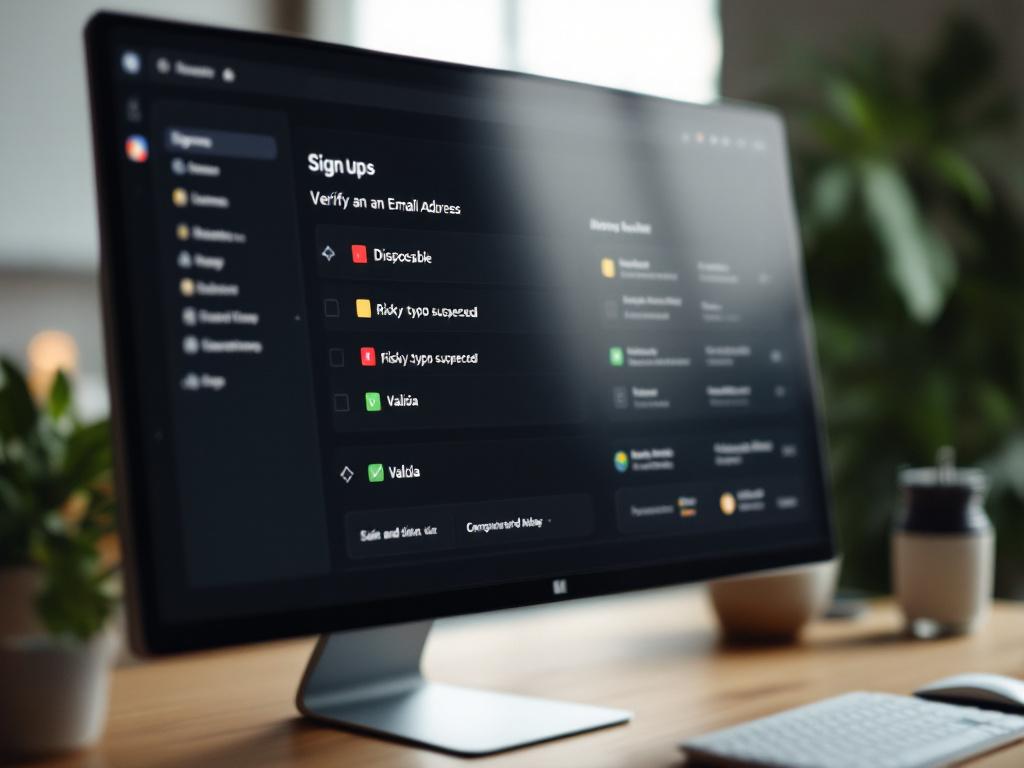
La domanda non è se verificare un indirizzo email — è quale metodo di verifica cattura quale fallimento. Questa guida esamina un esempio di verifica dell'indirizzo email per ciascuna delle sette modalità di errore che drenano denaro reale da flussi di iscrizione reali, le risposte API che producono e i modelli di integrazione che trasformano ciascuno pattern in una decisione di policy a una riga.
Indice dei Contenuti
- Il Costo Nascosto di un'Iscrizione Non Verificata
- I Cinque Metodi di Verifica, Mappati a Quello che Catturano Effettivamente
- Esempi 1–3: Domini Temporanei, Indirizzi Basati su Ruoli e Errori di Dominio
- Esempi 4–5: Pulizia in Blocco delle Liste e il Problema della Trappola Spam
- Esempi 6–7: Flussi di Lavoro degli Agenti AI e Scoring del Rischio Contestuale
- Timing della Verifica: Tempo Reale all'Iscrizione vs. Batch Pre-Invio vs. Ibrido
- Elenco di Controllo dell'Implementazione per Ruolo
Il Costo Nascosto di un'Iscrizione Non Verificata
Un indirizzo email errato costa più della chiamata di verifica che lo avrebbe catturato. Il costo si compone in quattro livelli, ciascuno legato a un effetto a valle misurabile sulla deliverability, l'economia o il carico operativo.
Danno alla reputazione del mittente. Secondo le linee guida sui mittenti in blocco di Google, i mittenti con un tasso di reclamo spam superiore a 0,3% vedranno problemi di consegna "significativi" e l'obiettivo consigliato è inferiore a 0,1%. I mancati recapiti irreversibili — il risultato dell'invio a caselle di posta che non esistono — confluiscono direttamente nel sistema di reputazione di Gmail e nei Smart Network Data Services (SNDS) di Microsoft. Un cattivo import può spostare un dominio dal livello di reputazione "alto" a "medio" nel giro di giorni, e la ricostruzione richiede settimane di invio pulito.
Economia di prova gratuita sprecata. Fai il calcolo attraverso una prova gratuita di 14 giorni. Se il 6% delle tue iscrizioni utilizza indirizzi temporanei, ogni 1.000 iscrizioni significa 60 prove false che consumono risorse di calcolo, invii di email di onboarding automatizzati e tempo di follow-up CSM. A un modesto costo di $4 per prova, ciò rappresenta circa $240 di puro spreco per 1.000 iscrizioni — senza contare il danno all'analytics di fingere che quelle 60 prove siano dati reali del funnel di conversione.
Tassa di deliverability sugli utenti legittimi. Quando il punteggio del mittente scende, il costo non ricade sulle iscrizioni false. Ricade sui tuoi veri clienti. I messaggi di benvenuto, i ripristini delle password e gli avvisi di fatturazione agli utenti paganti iniziano a finire nelle cartelle spam. RFC 5321, lo standard SMTP che governa il trasporto della posta dal 1982, rende esplicitamente la gestione dei mancati recapiti responsabilità del mittente — non del destinatario, non del server di posta del destinatario. La tua reputazione, il tuo problema.
Un'iscrizione non verificata singola costa più di quello che la verifica costerà mai — in tassa di deliverability, inquinamento dello slot di prova e debito di reputazione che richiede settimane per ripagare.
Il timing conta più del metodo. Verificare all'iscrizione aggiunge circa 200ms di latenza a una singola chiamata API. Verificare dopo 50.000 invii costa reputazione che, secondo la documentazione di Gmail Postmaster Tools, richiede settimane di invio disciplinato per ripristinare. La convalida dell'indirizzo email in tempo reale sposta il costo da "tassa di reputazione continua" a "una singola chiamata API". Questa aritmetica è il motivo per cui i programmi email maturi trattano la verifica come infrastruttura, non come un interruttore di funzione.
Il resto di questa guida affronta quattro categorie di fallimento che rappresentano la maggior parte del danno:
- Domini temporanei e usa e getta — Mailinator, Guerrilla Mail e 3.000+ fornitori simili
- Sintatticamente valido ma non recapitabile — errori di battitura a domini typosquatted, caselle morte, indirizzi abbandonati
- Indirizzi basati su ruoli —
info@,noreply@,support@e altre caselle di posta condivise con alti tassi di reclamo - Trappole spam e frode contestuale — indirizzi che si consegnano con successo ma segnalano cattiva igiene della lista agli ISP
Ogni categoria richiede un metodo di verifica diverso. La sezione successiva mappa i cinque metodi rispetto a quello che ciascuno cattura effettivamente.
I Cinque Metodi di Verifica, Mappati a Quello che Catturano Effettivamente
Nessun singolo metodo di verifica cattura ogni modalità di errore. I sistemi di produzione sovrappongono tre o quattro metodi all'interno di una singola risposta API, perché ogni livello affronta un tipo diverso di errore. La tabella seguente mappa i cinque metodi utilizzati negli stack di verifica maturi rispetto a quello che ciascuno cattura, quello che ciascuno perde e la latenza tipica.
| Metodo | Cosa cattura | Cosa perde | Latenza tipica |
|---|---|---|---|
| Convalida della sintassi (RFC 5322) | Indirizzi malformati, caratteri illegali, @ mancante | Qualsiasi cosa che sembri valida ma non sia recapitabile | <5ms |
| Ricerca DNS / record MX | Domini senza server di posta configurati | Domini temporanei (hanno MX), errori di battitura a domini reali | 20–80ms |
| Corrispondenza di dominio temporaneo | Mailinator, Guerrilla Mail, Temp-Mail, 10MinuteMail, 3.000+ provider noti | Domini temporanei appena creati o privati non ancora elencati | <10ms |
| Handshake SMTP (RCPT TO) | Caselle morte su server rigorosi | Domini catch-all, Yahoo/AOL accept-all, server grigliati | 200–2000ms |
| Scoring comportamentale / contestuale | Abuso di velocità, geo-mismatch, pattern sospetti | Iscrizioni isolate singole senza segnale storico | 50–150ms |
I metodi sono sovrapposti, non alternativi. Una tipica chiamata di convalida dell'indirizzo email in produzione esegue controllo della sintassi → ricerca MX → controllo temporaneo → handshake SMTP → scoring contestuale all'interno di una singola risposta, completando in circa 200–400ms. RFC 5322 definisce cosa rende un indirizzo legalmente sintatticamente valido. RFC 5321 governa come i server SMTP dovrebbero rispondere ai probe di verifica — e crucialmente, RFC 5321 §3.3 esplicitamente permette ai server di restituire codici di successo per i comandi RCPT TO senza verificare che la casella di posta esista effettivamente.
Questo permesso è il motivo per cui la verifica SMTP si è degradata come segnale autonomo. Yahoo, iCloud e molti tenant Microsoft 365 aziendali sono deliberatamente configurati per accept-all su RCPT TO per prevenire attacchi di enumerazione di nomi utente. Dalla prospettiva dell'API di verifica, ogni probe a quei domini restituisce "valido" — anche per indirizzi che non esistono. Non c'è una correzione al livello SMTP; il protocollo stesso permette l'ambiguità.
Il contatore è combinare la verifica SMTP con gli altri quattro metodi. Un dominio che restituisce accept-all su RCPT TO è ancora soggetto al rilevamento temporaneo (il dominio corrisponde a un elenco noto di provider temporanei?), controllo della sintassi (la parte locale è legale?) e segnali di reputazione (questo indirizzo esatto è apparso nei database di trappola spam?). Quando la domanda passa da "questa casella di posta è viva?" a "vale la pena inviare a questo indirizzo?", lo stack è quello che risponde.
Il takeaway pratico quando valuti un approccio di verifica — costruire internamente versus acquistare da un'API — è quale combinazione di metodi viene eseguita in una chiamata, non quale singolo metodo è "migliore". Un servizio di verifica che restituisce sintassi + MX + temporaneo + SMTP + score contestuale in una singola risposta sub-400ms sostituisce quello che altrimenti sarebbero cinque integrazioni separate e cinque modalità di errore separate da gestire nel tuo codice.
Esempi 1–3: Domini Temporanei, Indirizzi Basati su Ruoli e Errori di Dominio
I primi tre esempi coprono le modalità di errore che rappresentano la quota più grande di cattive iscrizioni in SaaS B2C e B2B: l'abuso di prova gratuita, l'acquisizione di lead basata su ruolo e il danno silenzioso degli errori di dominio.
Esempio 1: L'Abusatore di Prova Gratuita (alex@tempmail.com)
Scenario. Un SaaS B2B esamina i suoi dati di iscrizione e scopre che il 9% delle iscrizioni negli ultimi 30 giorni proviene da tempmail.com, guerrillamail.com e 10minutemail.com combinati. Nessuno di loro ha convertito. Tutti hanno consumato invii di email di onboarding e calcolo di prova.
Perché la convalida ingenua passa. tempmail.com è completamente conforme a RFC 5322 come sintassi. Ha record MX validi che puntano a server di posta reali — che è l'intero punto di un provider temporaneo, poiché le caselle di posta devono effettivamente ricevere i messaggi perché l'utente di abuso della prova confermì l'iscrizione. Sia il controllo della sintassi che la ricerca MX restituiscono "valido".
Cosa lo cattura. Corrispondenza di dominio temporaneo rispetto a un elenco nero mantenuto di 3.000+ provider temporanei noti. Il controllo è una semplice ricerca, costa meno di 10ms e restituisce un risultato binario.
Risposta JSON annotata di esempio:
{
  "email": "alex@tempmail.com",
  "is_valid_format": true,
  "is_mx_found": true,
  "is_disposable": true,
  "is_role_account": false,
  "result": "invalid",
  "reason": "disposable_domain"
}
Azione di policy. Blocca l'iscrizione a livello di form con un messaggio chiaro: "Gli indirizzi email temporanei non sono supportati. Si prega di utilizzare un indirizzo permanente." Questo è il singolo intervento con il ROI più alto nel problema dell'abuso di prova — un controllo booleano, un rifiuto a livello di form, e lo stack dei costi della Sezione 1 crolla a zero per l'indirizzo bloccato. Un controllo di indirizzi email usa e getta dedicato esiste specificamente per rendere questo un'integrazione a una riga.
Esempio 2: L'Indirizzo Basato su Ruolo (info@acmecorp.com)
Scenario. Un modulo di lead su un sito di marketing B2B riceve una sottomissione da info@acmecorp.com. Il dominio è reale, la casella di posta è reale e l'indirizzo accetta posta senza problemi. Ma è un elenco di distribuzione condiviso, spesso non monitorato e frequentemente utilizzato come catchall da piccole imprese.
Perché la maggior parte dei controlli passa. Sintassi: valida. MX: valida. SMTP: la casella di posta accetta posta. Temporaneo: non contrassegnato. Ogni segnale di verifica standard restituisce verde.
Il problema di deliverability. Gli indirizzi basati su ruoli — info@, noreply@, sales@, admin@, postmaster@, abuse@ — hanno tassi di reclamo sostanzialmente più alti rispetto agli indirizzi personali, secondo le linee guida di lunga data del M3AAWG (Messaging, Malware and Mobile Anti-Abuse Working Group). Sono caselle di posta condivise. I destinatari non si sono iscritti personalmente. Chiunque legga la casella di posta quel giorno fa clic su "spam" su qualsiasi cosa non riconosca immediatamente. Più di questi reclami abbassano il tuo punteggio di mittente sugli stessi sistemi di reputazione che valutano la tua posta transazionale.
Cosa lo cattura. Rilevamento dell'account basato su ruoli basato su pattern che corrisponde alla parte locale rispetto a un elenco di circa 30 prefissi di ruolo noti.
Risposta JSON di esempio:
{
  "email": "info@acmecorp.com",
  "is_valid_format": true,
  "is_mx_found": true,
  "is_disposable": false,
  "is_role_account": true,
  "result": "risky",
  "reason": "role_based_address"
}
Azione di policy. Non bloccare. Richiedere. "Abbiamo notato che si tratta di una casella di posta condivisa. Per gli aggiornamenti specifici dell'account, considera di inserire un'email personale." L'asimmetria è importante: bloccare info@ infastidisce prospect legittimi che usano effettivamente caselle di posta condivise per la valutazione dei fornitori. Richiedere le cattura come un lead contrassegnato ma accettabile, segmentato fuori dalle sequenze di nurture ad alto volume.
Esempio 3: L'Errore di Battitura Invisibile (sarah.chen@gmial.com)
Scenario. Un utente su un modulo di iscrizione digita il suo email velocemente e digita male gmail.com come gmial.com. Il dominio gmial.com si risolve — è un dominio typosquat reale e registrato con record MX di dominio parcheggiato che accettano posta e la scartano.
Perché la sintassi e MX passano. Entrambi sono tecnicamente validi. L'indirizzo è ben formato. Il dominio ha record MX. La casella di posta esiste anche nel senso che l'MX di dominio parcheggiato accetta il messaggio.
Cosa lo cattura. Un livello di correzione degli errori di battitura che confronta il dominio inviato rispetto a un elenco di provider ad alto volume — gmail.com, yahoo.com, outlook.com, hotmail.com, icloud.com — utilizzando la distanza di Levenshtein ≤ 2. gmial.com è una trasposizione lontana da gmail.com; l'algoritmo lo contrassegna e suggerisce la correzione.
Risposta JSON di esempio:
{
  "email": "sarah.chen@gmial.com",
  "is_valid_format": true,
  "is_mx_found": true,
  "did_you_mean": "sarah.chen@gmail.com",
  "result": "risky",
  "reason": "possible_typo"
}
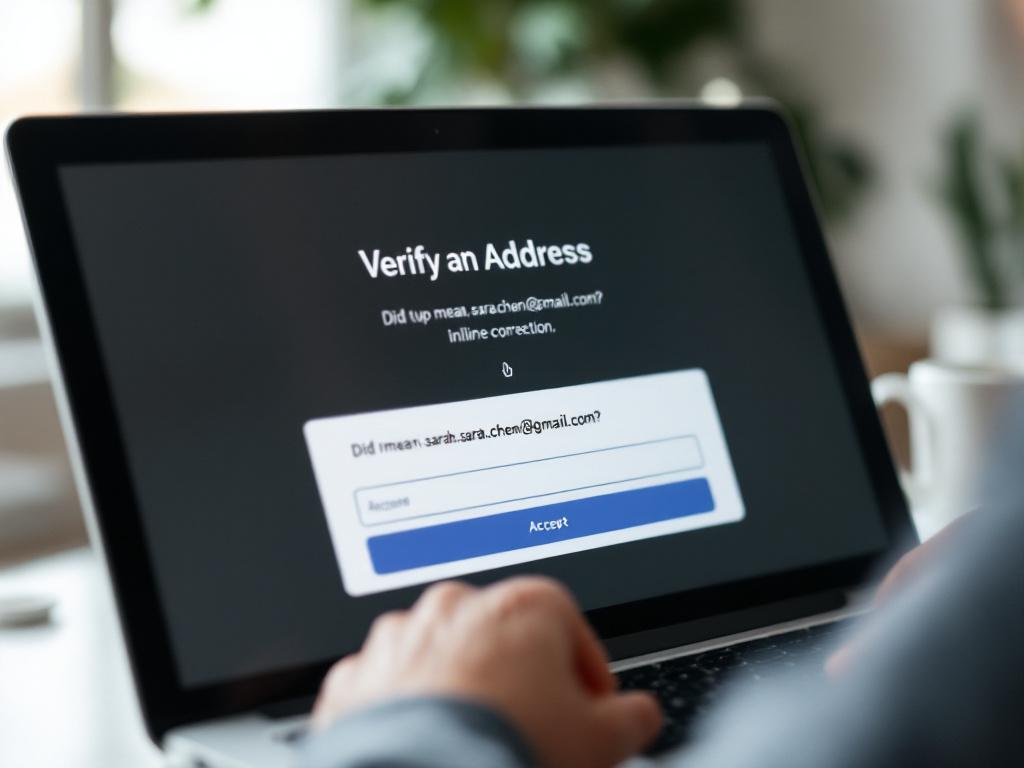
Azione di policy. Renderizza un prompt di form inline: "Intendevi sarah.chen@gmail.com?" con accettazione con un clic. Questo pattern riduce il tasso di mancato recapito senza aggiungere attrito di iscrizione. Sarah riceve il suo email di benvenuto. La tua reputazione di mittente non subisce un colpo di soft-bounce. Il costo di integrazione è un controllo condizionale frontend su uno alla volta sul campo did_you_mean.
Esempi 4–5: Pulizia in Blocco delle Liste e il Problema della Trappola Spam
I primi tre esempi gestiscono la verifica del flusso di iscrizione in tempo reale. I successivi due affrontano cosa succede quando erediti una lista — attraverso uno sponsorizzazione evento, una partnership, un'acquisizione — o quando una lista che invecchia sviluppa il tipo di decadimento che la verifica in tempo reale non può vedere.
Esempio 4: La Lista di Lead Importata (50.000 Indirizzi, Qualità Sconosciuta)
Un team di marketing eredita una lista di lead con 50.000 indirizzi da uno sponsorizzazione di conferenza. Prima della prima campagna, eseguono una verifica in batch. Saltare questo passaggio e inviare direttamente è la causa singola più comune di un calo di reputazione Gmail Postmaster evitabile.
Passaggi del processo per la verifica in batch prima dell'invio:
- Carica e deduplicazione. Rimuovi i duplicati esatti e normalizza la casing sulla parte locale e sul dominio. Aspettati una riduzione del 2–5%.
- Passaggio di sintassi + MX. Rifiuta gli indirizzi che non superano la sintassi RFC 5322 o senza record MX. Rimozione tipica: 1–3%.
- Filtro temporaneo + ruolo. Contrassegna — non rigettare automaticamente — domini temporanei e account basati su ruoli. Lascia che il marketing decida se sopprimere o inviare a un segmento di ri-permesso. Tasso di contrassegno tipico: 4–8%.
- Handshake SMTP dove supportato. Identifica i candidati a hard-bounce sondando
RCPT TOrispetto ai domini che non accettano-tutto. Salta interamente il passaggio SMTP per domini accept-all dove il risultato è privo di significato. Rimozione tipica: 3–6%. - Segmenta per livello di rischio. Tre bucket: verde (invia normalmente), giallo (invia solo a segmenti impegnati o di ri-permesso), rosso (sopprimi completamente).
- Monitora le metriche del primo invio. L'obiettivo di tasso di mancato recapito per le linee guida sui mittenti in blocco di Gmail è inferiore allo 0,3% per la conformità e inferiore allo 0,1% per una reputazione sana. Se il tuo primo invio a una lista pulita arriva sopra l'1%, la pulizia non ha funzionato e devi fermare la campagna prima che danneggiano la reputazione di mittente più ampia.
Il confronto dei costi è unidirezionale. Verificare 50.000 email attraverso un'API di convalida email in batch è un'operazione una tantum che si completa in minuti. Inviare a una lista non verificata una volta e attivare un posizionamento in cartella spam di Gmail, secondo la documentazione di Gmail Postmaster Tools, può sopprimere il posizionamento per campagne legittime dallo stesso dominio per settimane.
Esempio 5: La Trappola Spam
Le trappole spam sono indirizzi gestiti da ISP e provider di blacklist — Spamhaus, SpamCop e altri — specificamente per identificare mittenti con cattiva igiene della lista. Ci sono due tipi, e la distinzione è importante perché segnalano problemi diversi:
- Le trappole incontaminate sono indirizzi che non sono mai stati utilizzati da una persona reale. Sono piantati su pagine web specificamente per i scraper per raccogliere. Se invii a uno, la matematica è semplice: hai raschiato la lista, o l'hai acquistata da qualcuno che l'ha fatto.
- Le trappole riciclate erano una volta indirizzi reali e attivi che sono stati abbandonati per 12+ mesi e riattivati dall'ISP come trappola. Colpirne uno segnala che non stai rimuovendo i sottoscrittori inattivi dalla tua lista — esattamente il fallimento di igiene della lista che gli ISP vogliono penalizzare.
Perché la verifica standard è insufficiente. Le trappole spam consegnano posta con successo. Questo è l'intero punto di esse. Sintassi: valida. MX: valida. SMTP: accetta. Temporaneo: no. Basato su ruolo: no. Ogni segnale di verifica standard restituisce verde, perché la trappola è operativamente una casella di posta normale.
Il segnale deve provenire da database di reputazione che seguono i pattern di trappola noti, spesso condivisi tra fornitori di verifica e provider di blacklist. Secondo la guida pubblicata da Spamhaus sulle trappole spam, essere elencati su Spamhaus Block List (SBL) a causa di hit di trappola spam richiede una richiesta formale di rimozione dall'elenco e tipicamente 30+ giorni per recuperare completamente la reputazione di invio — assumendo che il problema sottostante di igiene della lista sia risolto.
Azione di policy per liste importate ad alto rischio. Eseguile attraverso sia un'API di verifica email che un'API di blacklist separata prima di qualsiasi invio. Sopprimi qualsiasi indirizzo contrassegnato su entrambi. Il costo combinato dei due controlli è frazionario rispetto anche a un singolo evento di blacklist SBL, e l'unico modo per verificare gli indirizzi email rispetto al problema di trappola spam su scala è attraverso il livello di reputazione che si trova oltre sintassi, MX e SMTP.
Esempi 6–7: Flussi di Lavoro degli Agenti AI e Scoring del Rischio Contestuale
Gli ultimi due esempi affrontano le modalità di errore che emergono nei nuovi modelli di integrazione — agenti AI che gestiscono dati in entrata e flussi di iscrizione che affrontano abusi scritti piuttosto che cattivi attori individuali.
Esempio 6: Verifica Compatibile con MCP All'Interno di un Agente AI
Scenario. Uno sviluppatore sta costruendo un agente AI in Claude Desktop o Cursor che elabora le sottomissioni di moduli di lead in entrata, le arricchisce con dati firmografici e le scrive su HubSpot. Senza verifica, l'agente passa attraverso john@tempmail.com e noreply@vendor.com come lead reali. L'agente non sa cosa una casella di posta non monitorata o un dominio temporaneo sia — vede solo un campo email strutturalmente valido e agisce su di esso.
Il modello di integrazione MCP. Il Model Context Protocol, introdotto da Anthropic a novembre 2024, è uno standard aperto che permette agli agenti AI di chiamare strumenti esterni attraverso un'interfaccia standardizzata. Un server MCP di verifica espone uno strumento verify_email che l'agente chiama prima di qualsiasi azione a valle — arricchimento, scrittura CRM, notifica. La chiamata di verifica diventa una precondizione per la verifica dell'indirizzo email in tempo reale all'interno del grafico decisionale dell'agente.
Flusso decisionale dell'agente:
- Il webhook in entrata si attiva con dati di form.
- L'agente chiama
verify_email(address)tramite l'interfaccia dello strumento MCP. - La risposta restituisce campi strutturati:
is_disposable,is_role_account,result,confidence_score. - L'agente si ramifica sul risultato: valido → arricchisci e scrivi su CRM; rischioso → contrassegna per coda di revisione umana; non valido → scarta il lead con il motivo registrato.
Risposta JSON di esempio dal lato dell'agente:
{
  "email": "john@tempmail.com",
  "result": "invalid",
  "is_disposable": true,
  "confidence_score": 98,
  "recommended_action": "block"
}
Il beneficio è strutturale: zero ritardo umano nel loop per il circa 92% delle iscrizioni che sono pulite, con escalation strutturata per il resto. L'agente non spreca mai una chiamata di arricchimento (che spesso ha un costo per record) su un controllo di indirizzi email usa e getta, e il CRM non accumula mai il tipo di record spazzatura che avvelenano silenziosamente l'analytics della sequenza di nurture nel corso dei mesi.

Le sette modalità di errore — temporaneo, basato su ruolo, errore di battitura, casella di posta morta, accept-all, trappola spam, frode contestuale — non sono problemi separati. Sono un problema con sette facce, e l'API giusta espone tutte e sette in una singola risposta.
Esempio 7: Scoring del Rischio Contestuale (Oltre l'Indirizzo Stesso)
Scenario. Tre iscrizioni arrivano entro 90 secondi, tutte dallo stesso blocco IP /24, tutte utilizzando pattern firstname.lastname@gmail.com, tutte da un paese in cui il SaaS non ha presenza di marketing e nessuna base utente storica. Ogni indirizzo individuale verifica come valido in isolamento. Sintassi, MX, temporaneo, ruolo, SMTP — tutto verde per tutti e tre.
Perché la verifica a livello di indirizzo non è sufficiente. Gli indirizzi sono reali. Il pattern è frode — più probabilmente un tentativo di abuso di prova scritto o una configurazione di test con carta di credito utilizzando indirizzi taggati gmail (firstname.lastname+1@gmail.com, +2, +3) per eludere il rilevamento duplicato.
Cosa aggiunge lo scoring contestuale:
- Velocità — iscrizioni per IP al minuto, iscrizioni per impronta digitale del dispositivo all'ora
- Geo-mismatch — paese di iscrizione versus distribuzione della base utente tipica
- Pattern adiacente-temporaneo — uso ad alta frequenza del tagging di suffisso gmail o altre enumerazioni di tipo catchall
- Età dell'indirizzo — per quanto tempo questo indirizzo esatto esiste in qualsiasi database di verifica; gli indirizzi nuovi di zecca senza storia hanno punteggi più bassi
Azione di policy. Per punteggi di confidenza sotto una soglia definita — comunemente 70/100 — richiedere la conferma dell'email tramite magic link prima di concedere l'accesso alla prova. Questo blocca l'abuso scritto senza aggiungere attrito per gli utenti legittimi, che semplicemente fanno clic su un link che stavano per ricevere comunque. Un'API di convalida email capace espone i segnali contestuali nella stessa risposta di quelli a livello di indirizzo, quindi il codice del flusso di iscrizione prende una singola decisione rispetto a un singolo payload.
I sette esempi insieme coprono la superficie di errore realistica: errori di formato, domini temporanei, account basati su ruoli, errori di battitura, caselle di posta morte, trappole spam e frode contestuale. Un'API di verifica che espone tutti e sette i segnali in una risposta — piuttosto che richiedere sette integrazioni separate — è l'obiettivo di integrazione.
Timing della Verifica: Tempo Reale all'Iscrizione vs. Batch Pre-Invio vs. Ibrido
Il timing è una decisione separata dal metodo. Gli stessi metodi di verifica possono essere distribuiti all'iscrizione — un indirizzo per volta, sensibile alla latenza — o pre-invio, in batch di migliaia, ottimizzati per throughput. La maggior parte dei programmi email maturi usa entrambi, perché catturano diverse modalità di errore in diversi punti del ciclo di vita della posta. La verifica in tempo reale gestisce l'inquinamento in entrata. La verifica in batch gestisce liste ereditate o decadute.

L'elenco di controllo decisionale di seguito mappa la tua situazione sulla posizione del timing che la corrisponde. Auto-valuta ogni elemento; le risposte compongono la tua strategia di timing.
- Offri una prova gratuita o un livello freemium? Tempo reale all'iscrizione è obbligatorio. Le iscrizioni temporanee consumono direttamente l'economia di prova e ogni ora che siedono nel database è un'ora di analytics falsificate.
- Hai un'iscrizione a pagamento con carta di credito? Tempo reale è ancora consigliato. Riduce la frode di chargeback, il carico di supporto di rimborso e il costo operativo della pulizia di account premium falsi.
- Importi liste di lead da eventi, partner o dati acquistati? Batch pre-invio è obbligatorio prima della prima campagna. Nessuna eccezione — il solo rischio di blacklist SBL giustifica la chiamata.
- Il tuo volume di invio mensile è superiore a 10.000? Entrambi. Le linee guida sui mittenti in blocco di Gmail si applicano a 5.000+ messaggi/giorno agli indirizzi Gmail, e la convalida dell'email sia nel timing che nei punti è il modo più pulito per restare sotto la soglia di tasso di reclamo dello 0,3%.
- Sei stato inserito in una blacklist o hai visto un calo di reputazione di Gmail Postmaster? Esegui un batch dell'intero database immediatamente — ogni indirizzo — quindi aggiungi tempo reale all'iscrizione prima di riaprire il funnel. Inviare più posta a una reputazione già danneggiata accelera il danno.
- Operi in un settore regolamentato — finanza, salute, legale? Entrambi, con log di audit conservati per i requisiti di conformità. Le chiamate di verifica diventano parte del record di dovuta diligenza dimostrabile.
- Sono le tue risorse di ingegneria limitate? Inizia con tempo reale all'iscrizione. È il singolo intervento con il ROI più alto perché previene l'inquinamento dall'entrare nel sistema in primo luogo, il che è strutturalmente più economico che pulirlo in seguito.
- Stai eseguendo agenti AI che toccano dati di email? Tempo reale tramite server MCP, prima di qualsiasi azione a valle. Gli agenti processano a velocità di macchina; senza un gate di verifica, scriveranno spazzatura nel CRM più velocemente di quanto gli umani possano catturarla.
Elenco di Controllo dell'Implementazione per Ruolo
Lo stack di verifica vive nei flussi di lavoro di tre ruoli diversi. Product possiede la policy e le metriche. Engineering possiede l'integrazione e l'affidabilità. Il marketing della posta possiede l'igiene continua della lista. Ogni ruolo ha 5–6 azioni da spedire questo trimestre.
Per Product Manager
- Audit dei dati di iscrizione attuali. Estrai gli ultimi 90 giorni di iscrizioni. Conta quale percentuale sono temporanei, basati su ruoli o hard-bounced. Questo è il tuo baseline — ogni metrica successiva si misura rispetto ad esso.
- Quantifica il costo. Moltiplica il tasso di cattiva iscrizione × iscrizioni mensili × (CAC + costo di calcolo di prova). Il risultato è il tuo ceiling del budget di verifica. La maggior parte dei team scopre che il costo di verifica effettivo è circa il 5–10% dello spreco che elimina.
- Definisci l'obiettivo di tasso di mancato recapito. Fai riferimento alle soglie di reclamo spam di Gmail <0,3% e mittente in blocco. Imposta un obiettivo interno più stretto rispetto a quello esterno — la maggior parte dei team punta a inferiore allo 0,1% come ceiling operativo.
- Decidi la policy per ogni livello di risultato. Blocca su
invalid, richiedi suriskyedid_you_meanpopolato, accetta suvalid. Documenta la policy in modo che engineering e marketing possano implementarla senza rinegoziare le decisioni. - Scegli la posizione del timing. Tempo reale, batch o ibrido basato sull'elenco di controllo della Sezione 6. Non scegliere uno e aggiungere l'altro dopo — il secondo è sempre più difficile da retro-montare che da pianificare in anticipo.
- Imposta la metrica di successo. Tasso di mancato recapito, punteggio di mittente o conversione da prova gratuita a pagamento — scegli uno come KPI di verifica e strumentarlo prima di spedire. Altrimenti non avrai alcuna evidenza che l'integrazione ha funzionato.
Per Team di Engineering
- Valuta la superficie dell'API. Conferma che l'endpoint di convalida dell'indirizzo email restituisce almeno:
is_valid_format,is_mx_found,is_disposable,is_role_account,resultedid_you_mean. Qualsiasi cosa di meno è un'integrazione parziale. - Testa la latenza end-to-end. Obiettivo sotto 400ms p95 per mantenere i flussi di iscrizione snappy. Misura dal tuo server applicazioni, non dal dashboard del fornitore dell'API — il percorso completo all'utente è quello che conta.
- Implementa un fallback. Cosa succede se l'API di verifica si stacca o restituisce 500? Predefinito a "consenti con flag" e ri-verifica asincrona, o predefinito a "blocca" — scegli deliberatamente e documenta. I fallimenti silenziosi qui sono il peggior tipo perché sembrano che l'API stia funzionando.
- Aggiungi logging strutturato. Registra ogni risultato di verifica con timestamp, IP di iscrizione e codice di risultato. Questo diventa l'audit trail quando product chiede perché i tassi di mancato recapito sono ancora elevati, o quando fraud investigates a chargeback.
- Connetti la UX di correzione degli errori di battitura. Quando
did_you_meanè popolato, renderizza un prompt inline con accettazione a un clic. Questo è il singolo pattern UX con il impatto più alto nell'intera integrazione. - Per agenti AI: Connetti tramite server MCP in modo che gli agenti chiamino
verify_emailprima di qualsiasi azione di CRM o flusso di lavoro. Trattalo come una precondizione, non come un passaggio di arricchimento.
Per Email Marketer
- Esegui una verifica in batch sul tuo intero database. Segmenta i risultati in verde, giallo e rosso. Finché questo non esiste, ogni metrica di campagna è contaminata da invii a indirizzi che non avrebbero mai dovuto ricevere.
- Sopprimi tutto il rosso. Temporaneo, hard-bounce e candidati a trappola spam non vengono mai inviati. Mai. Non c'è campagna abbastanza intelligente da recuperare da un evento di blacklist SBL.
- Tratta il giallo come un segmento di ri-engagement. Gli indirizzi basati su ruoli e rischiosi ottengono campagne di ri-permission mirate, non blast in blocco. Il volume di invio è più basso; il segnale di engagement per indirizzo è quello che stai costruendo.
- Ri-verifica trimestralmente. Le trappole spam riciclate e il decadimento degli indirizzi significano che una lista pulita al mese 0 non è pulita al mese 6. La guida di Spamhaus raccomanda di sopprimere gli indirizzi inattivi per 12+ mesi specificamente perché questa è la finestra in cui l'attivazione della trappola riciclata tipicamente accade.
- Monitora Gmail Postmaster Tools e Microsoft SNDS settimanalmente. La reputazione del dominio e la reputazione dell'IP sono i principali indicatori che la tua policy di verifica sta funzionando — o non sta funzionando. Se la reputazione cade mentre i tassi di mancato recapito sembrano normali, il problema è a monte dei mancati recapiti e lo stack di verifica ha bisogno di un altro livello.
Ogni esempio in questa guida — l'indirizzo temporaneo all'iscrizione, il lead basato su ruolo, l'errore di battitura gmial.com, l'importazione in blocco e mancato recapito, la trappola spam, il caso edge dell'agente AI, il pattern di frode di velocità — si riduce a una singola chiamata API quando lo stack di verifica è costruito correttamente. I metodi sono ben definiti. Gli standard in RFC 5321 e RFC 5322 hanno oltre 40 anni. Le sette modalità di errore sono conoscibili in anticipo. Quello che separa un database di iscrizione pulito da uno inquinato è se l'esempio di verifica dell'indirizzo email che stai gestendo in questo momento riceve la chiamata prima che l'indirizzo entri nel sistema, o dopo.